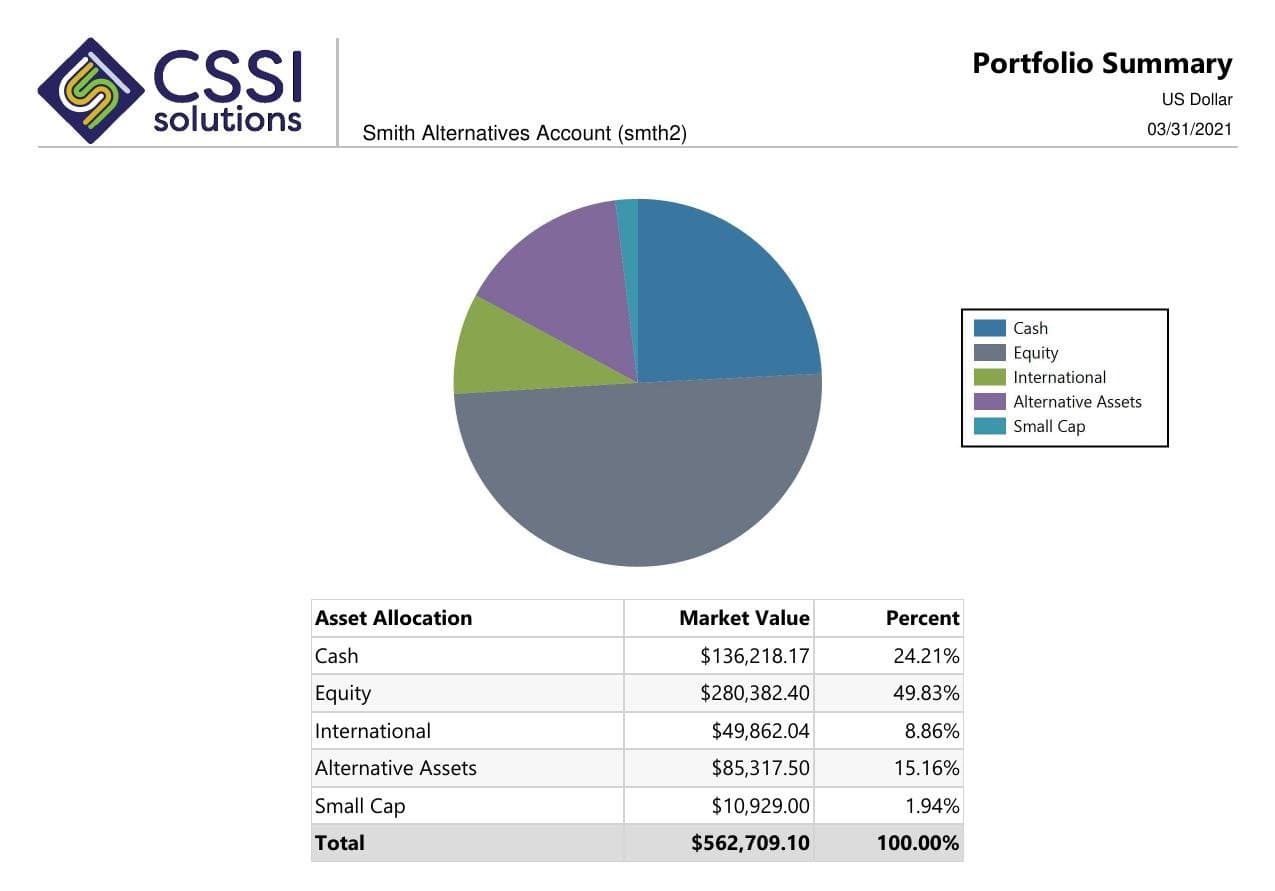
A multi-custodian investment report depends on consistent account mappings, usable source data, and an agreed reporting date. CSSI can review the data preparation, reconciliation, report development, and package work around your APX or Axys environment before you expand a consolidated view.
Data-readiness checks for the accounts and custodians in the report
Explicit handling of reporting dates, transfers, and unresolved differences
A defined path from source data to an approved account or household package
From a CSSI customer engagement
See reporting built around an existing Axys system
In a published CSSI engagement, a long-only equity manager used Portal+ to modernize quarterly report preparation and delivery while retaining Advent Axys. The case study includes before-and-after report examples. Use it to review the reporting approach; each engagement needs its own scope.
Define the custodians, accounts, source files or connections, and portfolio-system records used for the view. CSSI's data and back-office work can support source preparation and reconciliation. Any new feed needs a feasibility review covering availability, format, timing, and responsibility for exceptions.
When the report is the last step
A custom layout cannot resolve conflicting source dates, duplicate accounts, or open cash and position differences. Agree the data checks and exception process first, then scope report groupings, package preparation, and delivery. The reconciliation service remains a separate operational responsibility.
Data readiness
Check the inputs before combining custodian accounts
Use this checklist for one representative report. The firm's source, reconciliation, and approval rules determine when the data is ready for release.
Scroll across to review all three columns.
Check the inputs before combining custodian accounts
Data boundary
Document before building the view
Check before release
Account and household mapping
The custodian account identifiers, portfolio-system records, household membership, and included or excluded accounts.
Each account appears in the intended view once, with ownership and grouping supported by the approved records.
Source dates and completeness
Expected files or refreshes, as-of dates, trade or settlement basis, and treatment of delayed sources.
Required sources are present on the agreed basis, or the report clearly identifies the approved exclusions and date differences.
Security and valuation mapping
Security identifiers, price sources, valuation dates, currency, and responsibility for unresolved mappings.
Holdings use the agreed identifiers and valuation basis; missing prices or stale valuations have an owner.
Cash and positions
The reference records, reconciliation process, tolerances, and outstanding differences.
Cash and position differences are resolved or explicitly handled under the firm's approval policy before the report is released.
Transfers between accounts
How the same transfer appears in sending and receiving records and how it is treated at account and consolidated levels.
The selected dates and consolidation rules avoid duplicate exposure or a misleading flow in the combined view.
Exceptions and package release
Missing data, approved adjustments, report version, reviewer, and recipient rules.
The approved figures and exceptions can be traced to the released package and the intended recipients.
Example scope
A household transfer across two custodians at quarter-end
Illustrative workflow: a household moves a position between accounts at two custodians near quarter-end. The sending and receiving records arrive on different schedules. A combined report can show a missing or duplicate position if the team mixes source dates or has no rule for the transfer in transit.
Agree the reporting date and basis, trace the transfer through both accounts, and reconcile the position before releasing the combined view. If the difference remains open, follow the firm's documented exception policy and make any reporting limitation visible. CSSI can scope the source preparation, reconciliation support, and report logic needed for that recurring check.
If the report needs a new custodian source, define the connection and available records first. Review financial data aggregation requirements for coverage, dates, mappings, and ongoing feed responsibilities.
Pilot workflow
Start with one reporting cycle
Choose the accounts and sources.
Limit the first review to a representative household or account group. Record the custodian sources, source dates, and desired reporting view.
Confirm data preparation.
Review account and security mappings, source availability, valuation rules, and the reconciliation process. Assess any additional feed before including it.
Compare a combined sample.
Check the report against the approved source records, including transfers, cash, positions, and group membership. Retain open differences and review decisions.
Connect approval to delivery.
Agree which exceptions hold a package, who approves release, and how a correction reaches recipients. Extend the workflow after the limited reporting cycle is accepted.
If recurring cash or position differences are the bottleneck, define the daily operational work before expanding the report. Explore APX reconciliation support.
Investment performance reporting review
Define the source numbers, report layout, benchmarks, and checks behind a recurring performance package. Review this reporting workflow.
Client report packages for RIAs
Set the package contents, household rules, review owners, and delivery steps for a recurring RIA reporting cycle. Review this reporting workflow.
Family office investment reporting
Define entity groupings, asset coverage, valuation dates, and access for a family office's investment reports. Review this reporting workflow.
Questions
Frequently asked questions
Straight answers to the implementation, workflow, and fit questions that usually come up first.
Can CSSI help with multi-custodian investment reporting?
CSSI can review data preparation, custodial workflows, reconciliation, custom reports, and packages around APX and Axys. Provide the sources, account mappings, required dates, and intended report so the team can confirm the support and any integration work.
Does Portal+ automatically connect every custodian?
Source coverage should be confirmed during scoping. Portal+ uses existing portfolio data for reporting and delivery. A new custodian feed or outside source needs review of availability, format, refresh timing, mapping, and exception handling.
How should a consolidated report handle different source dates?
Document the reporting basis and the date of each source. Agree how delayed records and missing valuations affect inclusion or release. Review that rule against a sample so a combined total does not imply a common date the inputs cannot support.
Is multi-custodian reporting the same as reconciliation?
Reconciliation checks source cash and positions against the portfolio records. Reporting uses the approved data to produce the required views and packages. Define the reconciliation owner and exception rules before relying on a combined report.
Next step
Review one reporting workflow with CSSI
Review one combined investment report and the custodial data behind it. CSSI can define the preparation, reconciliation, custom reporting, and delivery work needed for a recurring cycle.