CSSI helps RIAs prepare, review, and deliver recurring client report packages using APX, Axys, and SSRS. Define the reports each client should receive, the checks before release, and the handoff to secure delivery through Portal+.
A defined package for account, household, and advisor reporting needs
Custom reports and support for recurring package operations
Secure client access and document delivery through Portal+
From a CSSI customer engagement
See reporting built around an existing Axys system
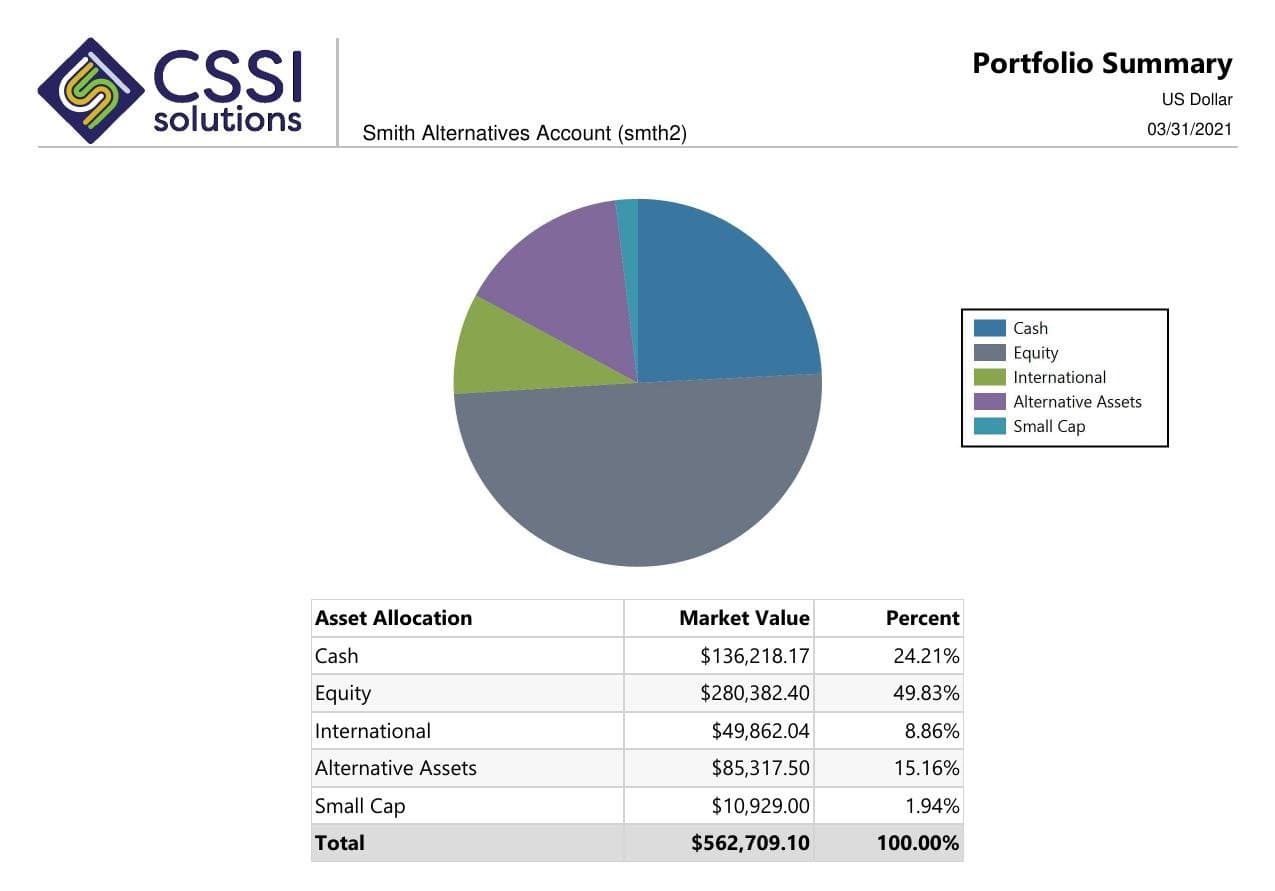
In a published CSSI engagement, a long-only equity manager used Portal+ to modernize quarterly report preparation and delivery while retaining Advent Axys. The case study includes before-and-after report examples. Use it to review the reporting approach; each engagement needs its own scope.
The reports may already exist, while operations still chooses files, combines packages, checks household membership, and handles missing pages each quarter. CSSI can review the package rules, report dependencies, and handoffs before proposing development or recurring support.
When delivery is the remaining gap
If the approved reports are ready but retrieval and resend requests consume the team's time, Portal+ can provide a client-facing access and delivery layer. Establish who can see each package and who handles access questions as part of the scope.
Package checklist
Define what a complete client package includes
This is a sample package specification, not a required report set. Include only the items your firm uses and assign a reviewer for each one.
Scroll across to review all three columns.
Define what a complete client package includes
Package item
Specify before preparation
Check before delivery
Cover letter or commentary
The approved wording, client or household name, reporting period, and applicable disclosures.
The version is current and belongs to the intended recipient.
Holdings or appraisal
The valuation date, included accounts, security groupings, and pricing source.
The account list and totals agree with the approved reporting population.
Performance report
The source calculations, periods, benchmark labels, and gross or net presentation.
The results tie to the agreed reference and the required reviewers have signed off.
Billing output, if included
The billing period, calculation source, and where the fee detail appears in the package.
The output agrees with the approved billing record and uses the correct client grouping.
Recipient and access
The client and advisor recipients, household visibility, and delivery method.
Each intended recipient can retrieve the right package; unrelated accounts are excluded.
Version and archive
The package naming rule, release version, storage location, and correction process.
The approved version is identifiable and the team knows how to replace a corrected package.
Example scope
One household, several accounts, one reporting package
Illustrative workflow: an RIA sends one quarterly package for a household with taxable and retirement accounts. Some pages apply to individual accounts, while the household summary combines them. An account added during the quarter creates a gap if the package rules and recipient list are maintained separately.
Before automating the run, agree which accounts belong to the household, which reports appear once or per account, and which recipients may see the package. Review a sample with the new account included, then check the delivered version using the intended client-access role. This tests preparation and delivery as one workflow.
Pilot workflow
Start with one reporting cycle
Choose a representative package.
Include the account and household structures that create the most preparation work. Record the reports, audience, and delivery deadline.
Agree the rules and handoffs.
Define package contents, source data, review owners, naming, and recipient access. Separate custom report development from recurring preparation and publishing.
Review a complete sample.
Check account membership, missing pages, figures, branding, and access with the responsible operations and client-service reviewers.
Run a limited delivery cycle.
Use an agreed pilot group before a wider rollout. Track preparation time, delivery exceptions, corrections, and document-retrieval requests.
When the layouts already exist, focus the engagement on recurring runs, package rules, checks, and delivery exceptions. Explore APX package support.
Investment performance reporting review
Define the source numbers, report layout, benchmarks, and checks behind a recurring performance package. Review this reporting workflow.
Investment reporting software evaluation
Use one representative report package to compare calculation, report development, client access, and delivery requirements. Review this reporting workflow.
Questions
Frequently asked questions
Straight answers to the implementation, workflow, and fit questions that usually come up first.
Can CSSI help if our client reports already exist?
Yes. The work may be package preparation, recurring checks, household rules, delivery, or client access. Reviewing one complete cycle helps identify whether the firm needs report development, operational support, Portal+, or a combination.
Do we need to replace our portfolio accounting system?
CSSI can improve reporting workflows around APX and Axys. Portal+ adds report packaging, presentation, and client access using existing portfolio data. The initial review should confirm the source systems and the specific workflow to support.
How do we decide between services and client reporting software?
Use services for report development and the operational work around recurring packages. Consider Portal+ when packaging, dashboards, secure retrieval, or delivery needs a software layer. Some projects need both, with separate deliverables.
What does a useful RIA reporting pilot cover?
Choose a representative package and an agreed recipient group. Review the included accounts, report contents, source figures, approvals, and client access. Track exceptions and correction requests before extending the workflow to more clients.
Next step
Review one reporting workflow with CSSI
Map one client package from preparation to retrieval. CSSI can help define the report development, recurring operations, and Portal+ delivery work your RIA needs.