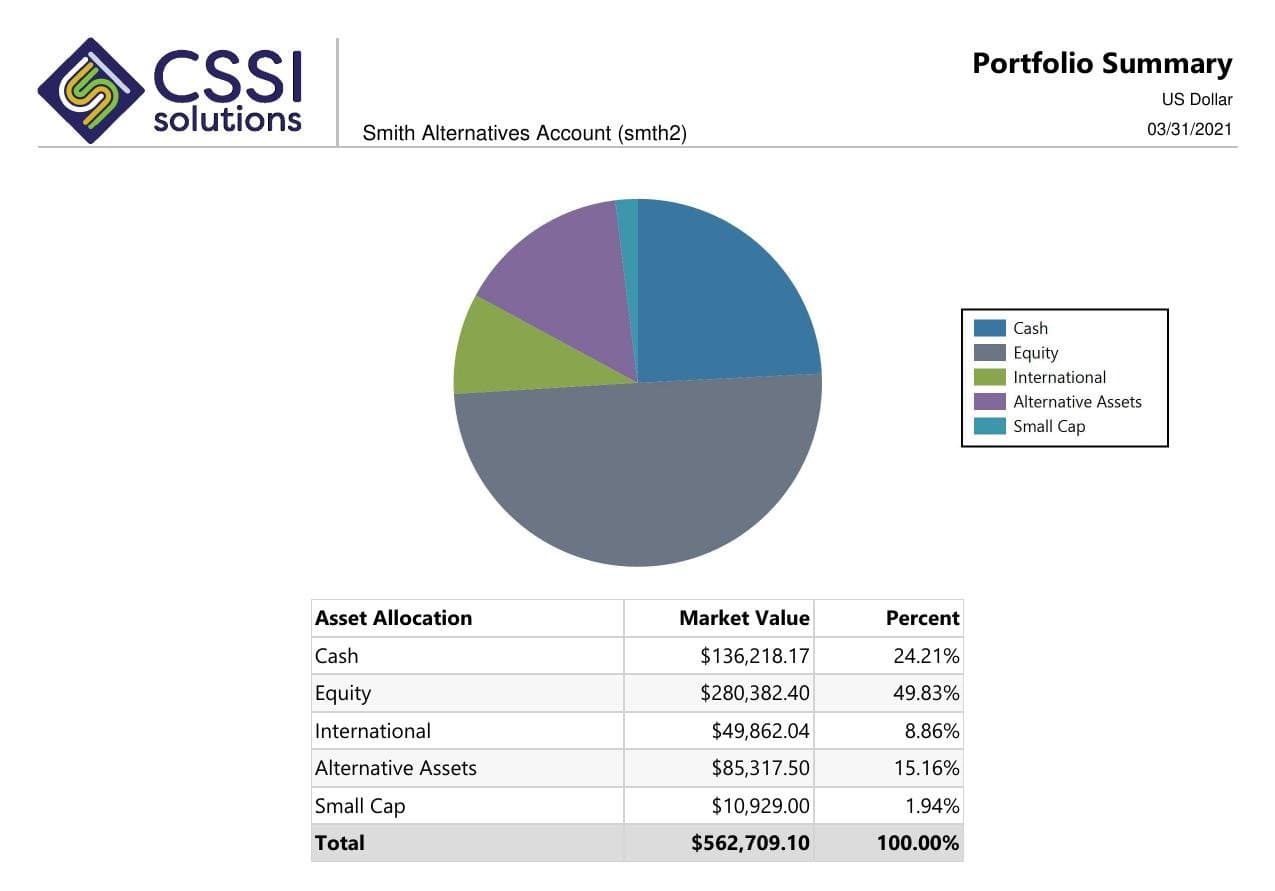
For family offices using APX or Axys, CSSI can help scope custom investment reports, recurring packages, and secure delivery. Start by defining the entities and assets in the report, the source of each figure, and who should receive each view.
Reporting scope defined by entity, account, asset, and valuation date
Custom investment reports and package support around APX and Axys
Review the required views and recipient access before choosing a delivery layer
From a CSSI customer engagement
See reporting built around an existing Axys system
In a published CSSI engagement, a long-only equity manager used Portal+ to modernize quarterly report preparation and delivery while retaining Advent Axys. The case study includes before-and-after report examples. Use it to review the reporting approach; each engagement needs its own scope.
CSSI's starting point is the portfolio data and reporting environment your office uses. A project can focus on custom report layouts, group definitions, package preparation, and client-facing delivery. Confirm the required sources and views during the scope review.
When evaluating family office reporting software
Separate investment reports and delivery from requirements for entity accounting, tax work, partnership allocations, or collecting every outside asset feed. Document those requirements first. Any additional source integration or accounting functionality needs a separate feasibility review.
Coverage checklist
Make the reporting boundary visible
Use this coverage checklist when reviewing an investment report or evaluating family office reporting software. Agree what is included before comparing a consolidated total.
Scroll across to review all three columns.
Make the reporting boundary visible
Reporting boundary
Document in the scope
Review before release
Entities and accounts
The reporting entities, account list, grouping rules, and ownership relationships represented in each view.
The view contains the intended accounts and does not imply ownership that the source records do not support.
Asset coverage
The holdings captured in the portfolio system and the assets that remain outside the report.
The report makes exclusions clear; a partial investment view is not labeled as the complete family balance sheet.
Private or infrequently valued assets
The valuation source, date, update responsibility, and treatment of missing or stale figures.
Readers can identify the valuation dates and any limits on the figures presented.
Rollups and duplicate exposure
How direct holdings, entity interests, and any underlying asset detail enter the summary.
An interest and its underlying assets are not counted twice in the same total.
Currency and period
The reporting currency, conversion source where applicable, and the as-of date for each source.
Totals use the agreed basis and any differences in source dates are visible.
Audience and access
Which family members, advisors, and operations users receive each entity or account view.
Each reviewer and recipient can see only the information intended for their role.
Example scope
An entity summary that avoids counting the same assets twice
Illustrative workflow: a family office needs an investment summary for a trust that holds a partnership interest. The partnership also has its own portfolio report. Adding the trust's interest value to all of the partnership's underlying holdings can overstate a combined total if the reporting rule does not distinguish those views.
A useful specification names the audience and purpose of each view, the source for ownership and valuations, and the rule for including an interest or its underlying detail. If an asset is outside APX or Axys, record the additional source and the work required to use it. CSSI should confirm that scope before committing to a report or delivery configuration.
Pilot workflow
Start with one reporting cycle
Define one investment view.
Choose the report audience and the entities or accounts it should cover. State the assets outside the initial scope.
Confirm data and feasibility.
Identify the available APX or Axys records and any additional sources. Agree grouping, valuation, currency, and rollup rules before report development.
Review the sample and its limits.
Compare the output with approved source records. Confirm entity membership, duplicate exposure, valuation dates, and how exclusions appear.
Confirm recipient views.
Test the agreed reports and access roles with a limited audience. Broaden delivery only after the office approves the coverage and presentation.
When the report depends on data outside the existing environment, assess source availability and preparation before promising a consolidated view. Explore investment data services.
Investment analytics reporting requirements
Define the source, grouping, benchmark, and validation rules for analytics shown in an investment report. Review this reporting workflow.
Multi-custodian investment reporting
Check account mappings, source dates, transfers, and reconciliation before combining custodial data in a report. Review this reporting workflow.
Questions
Frequently asked questions
Straight answers to the implementation, workflow, and fit questions that usually come up first.
What family office reporting work can CSSI review?
CSSI can review investment-report layouts, portfolio grouping, recurring packages, and delivery around APX and Axys. Share the required entities, accounts, sources, and recipients so the team can confirm the feasible reporting scope.
Does Portal+ replace family office accounting or tax software?
Portal+ provides a client-facing reporting and delivery layer using portfolio data. Entity accounting, tax preparation, partnership allocations, and other office requirements should be evaluated separately from that reporting scope.
Can the report include private investments or outside assets?
That depends on the data available, the valuation source, the required report, and any integration work. List those assets and sources in the initial review. Their inclusion should be confirmed rather than assumed from an existing APX or Axys connection.
What should a first family office reporting pilot prove?
It should prove one defined investment view: the right entity and account scope, documented asset coverage, understandable valuation dates, agreed rollup rules, and appropriate recipient access. A broader consolidated report may require additional data and development work.
Next step
Review one reporting workflow with CSSI
Start with one investment view and a clear coverage map. CSSI can assess the data, report development, package operations, and delivery work required for that scope.