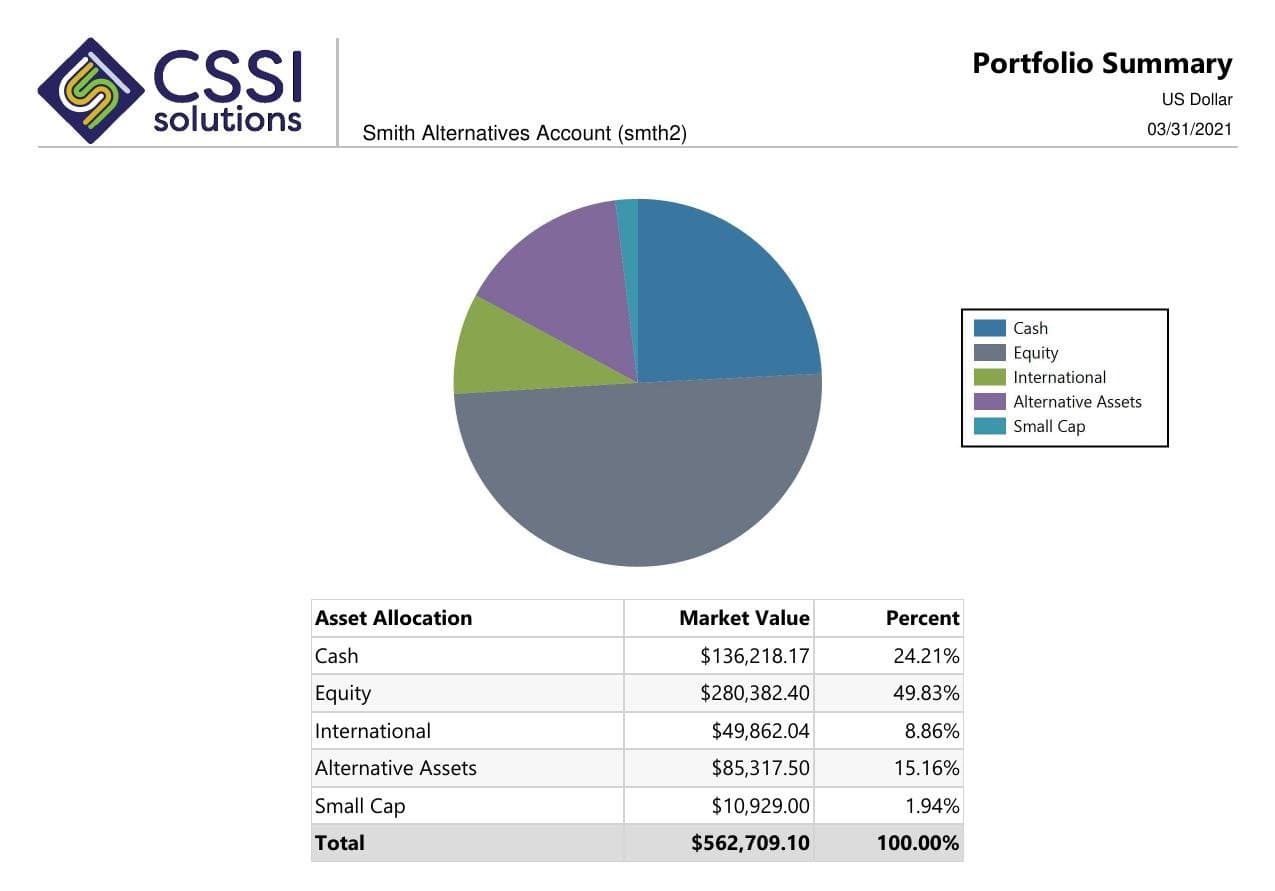
Evaluate investment reporting software against the work your firm needs to change. CSSI can help define the report layouts, recurring preparation, and client delivery requirements around APX and Axys, then show where Portal+ fits using a representative reporting package.
A comparison checklist built around your own report and source figures
Clear responsibilities for accounting, calculations, layouts, and delivery
A sample workflow to review before committing to a wider rollout
From a CSSI customer engagement
See reporting built around an existing Axys system
In a published CSSI engagement, a long-only equity manager used Portal+ to modernize quarterly report preparation and delivery while retaining Advent Axys. The case study includes before-and-after report examples. Use it to review the reporting approach; each engagement needs its own scope.
Start with the bottleneck: missing data, calculation requirements, report layouts, package preparation, or client retrieval. A reporting platform may cover several of those jobs. If APX or Axys already supplies the figures you approve, a new packaging and delivery layer can be evaluated separately from replacing that source.
Compare vendors using the same sample
Give each provider the same account or household scope, reporting period, approved source output, and delivery roles. Ask them to identify standard functionality, configuration, custom development, and work your team will still perform. CSSI can scope APX and SSRS report development, recurring package support, and Portal+ delivery against that specification.
Evaluation checklist
What to ask an investment reporting software provider
Use a masked sample package and agreed reference figures. Record the demonstration result, dependencies, and implementation owner for each requirement.
Scroll across to review all three columns.
What to ask an investment reporting software provider
Requirement
Ask the provider to demonstrate
Record before deciding
Source data and connection
How your account list, holdings, activity, and reporting dates enter the proposed workflow.
Supported sources, refresh timing, required mappings, exception handling, and any integration work.
Calculations and analytics
Where each return, benchmark comparison, attribution measure, or risk figure is calculated and how it ties to your reference.
The calculation owner, required modules or sources, methodology, and validation responsibilities.
Report layouts
The actual sample output, including group totals, disclosures, branding, and any custom pages.
Which layouts are standard, which need configuration or development, and how later changes are maintained.
Package preparation
One complete account or household package, including the handling of missing reports and corrected versions.
Package rules, review steps, recurring run responsibilities, and work that remains manual.
Client access and delivery
The experience of a client and advisor retrieving the approved package using their intended access roles.
Recipient rules, archive access, notification behavior, and how incorrect access or delivery is corrected.
Implementation and ongoing work
The proposed path from the sample to the first recurring reporting cycle.
Dependencies, fees and scope supplied by the provider, acceptance criteria, support ownership, and the exit or export process.
Example scope
The same quarterly package in two software demonstrations
Illustrative workflow: an RIA likes two reporting demonstrations. One includes portfolio accounting and performance calculations; the other uses existing APX output to prepare and deliver packages. A polished sample report does not show which work the firm would need to change.
Use a household package with a recently added account, a benchmark comparison, and a corrected document. Ask each provider to trace the figures to the approved source, prepare the full package, and retrieve it as the client. Record the required migration, configuration, development, and ongoing operations. The resulting comparison gives the firm a defined implementation scope alongside the visual output.
Pilot workflow
Start with one reporting cycle
Write the reporting brief.
Choose one recurring package and name its audience, source figures, reporting date, preparation work, and delivery needs.
Agree comparison criteria.
Use the checklist to separate standard software, configuration, custom reports, data work, and recurring operations. Name the people who will review each part.
Demonstrate the complete workflow.
Review the sample with approved source figures and intended access roles. Keep unresolved requirements and proposed implementation work with the comparison.
Scope the first recurring cycle.
Agree the deliverables, dependencies, acceptance checks, and support responsibilities. Expand after the firm accepts the sample and the first limited run.
If a required page or data view is missing from the existing output, define the APX or SSRS development before evaluating package automation. Explore custom report development.
Investment performance reporting review
Define the source numbers, report layout, benchmarks, and checks behind a recurring performance package. Review this reporting workflow.
Client report packages for RIAs
Set the package contents, household rules, review owners, and delivery steps for a recurring RIA reporting cycle. Review this reporting workflow.
Investment analytics reporting requirements
Define the source, grouping, benchmark, and validation rules for analytics shown in an investment report. Review this reporting workflow.
Product references
Use product scope to make the comparison meaningful
SS&C Advent describes APX as a central portfolio record with accounting, performance measurement, and reporting. Orion describes configurable client reports and composite performance reporting. Those product scopes help identify what a replacement project must cover. Review the providers' current descriptions: Advent Portfolio Exchange and Orion reporting.
These are examples of product scope, not a ranking or a feature-by-feature comparison. Confirm required modules, data connections, pricing, and implementation terms directly with each provider. CSSI's Portal+ review should establish the accounting and performance source it will use and the client-facing work it will support.
Questions
Frequently asked questions
Straight answers to the implementation, workflow, and fit questions that usually come up first.
How should we compare investment reporting software?
Use the same representative package, approved source figures, and recipient roles for each demonstration. Compare data connections, calculations, custom layouts, preparation, delivery, and ongoing responsibilities. Ask the provider to identify the work and dependencies behind the sample.
Where does Portal+ fit in a software evaluation?
Portal+ supports report packages, client dashboards, secure document access, and delivery using existing portfolio data. CSSI can also support custom APX and SSRS reports. The review should confirm the source systems and distinguish software configuration from report development and recurring operations.
Do we need a new performance engine to improve client reports?
That depends on the requirement. If your existing system supplies the approved figures and the problem is presentation, packages, or retrieval, assess those jobs first. New methodologies, attribution, or risk calculations need a separately identified source and validation scope.
Can CSSI provide a price or implementation timeline from this checklist?
The checklist helps prepare a scoped conversation. CSSI needs to review the source systems, sample output, required development, and delivery workflow before confirming fees or an implementation plan.
Next step
Review one reporting workflow with CSSI
Bring one report package and the requirements behind it. CSSI can define the APX or Axys reporting work, recurring operations, and Portal+ delivery scope to evaluate.