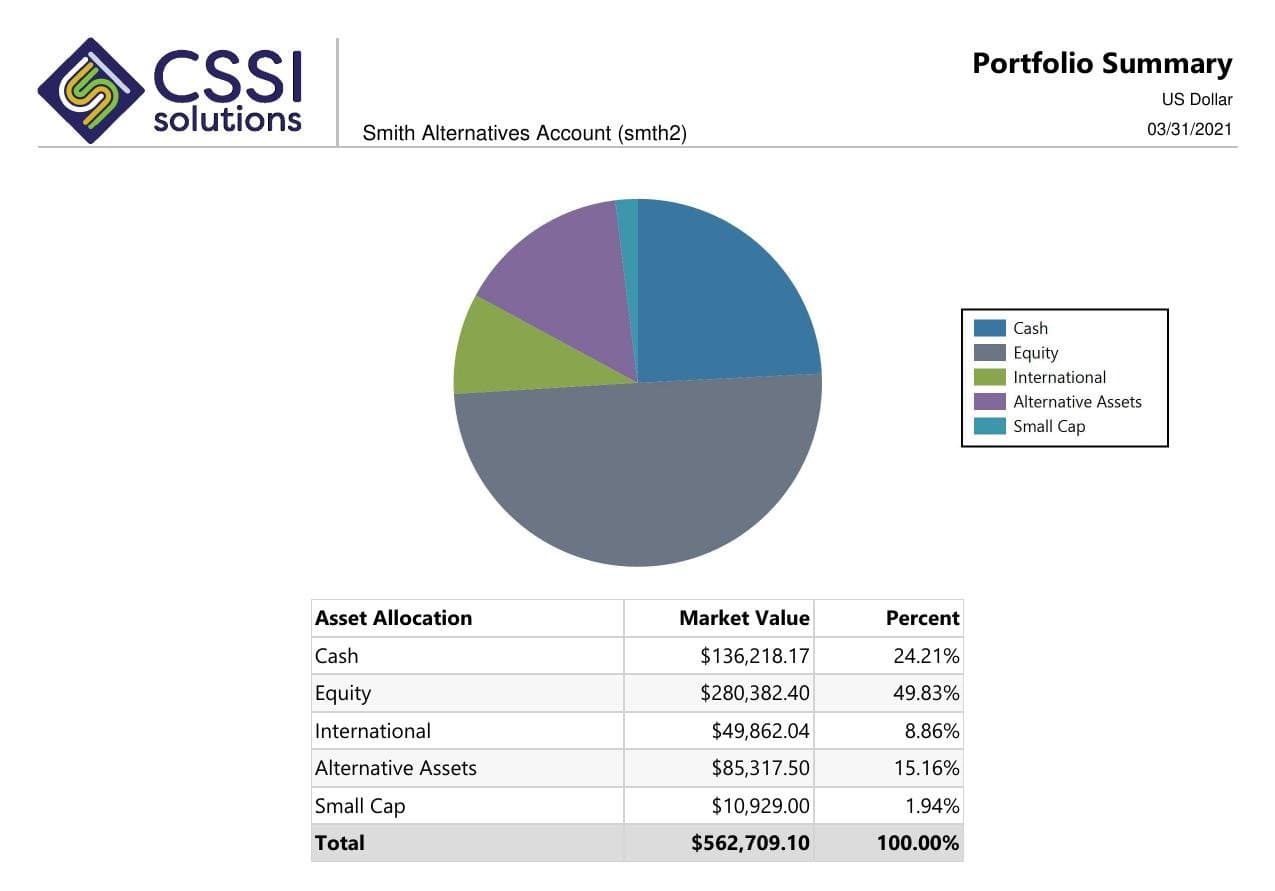
When evaluating investment analytics software or improving an existing report, define where each measure comes from and how it should appear. CSSI can review custom APX and SSRS reporting requirements and the path to client delivery. Confirm any additional analytics source or integration during scoping.
A reporting specification for measures, groups, periods, and benchmarks
Separate the analytical source from report logic and client delivery
Validate grouped totals against approved output before recurring use
From a CSSI customer engagement
See reporting built around an existing Axys system
In a published CSSI engagement, a long-only equity manager used Portal+ to modernize quarterly report preparation and delivery while retaining Advent Axys. The case study includes before-and-after report examples. Use it to review the reporting approach; each engagement needs its own scope.
An approved source may already supply the required allocation, performance, exposure, or other measures. The reporting job is to organize those figures into the views your investment team or clients need. CSSI can assess custom APX and SSRS layouts, available fields, group definitions, and recurring report preparation.
When the required measure is missing
Attribution, risk models, benchmark series, and other calculations need a named analytical source. Define the methodology, data requirements, and validation owner before promising the output. Portal+ provides a reporting and delivery layer; it should not be selected as a substitute for an attribution or risk calculation engine.
Analytics checklist
Define the measure before designing the report
Use the specification with an approved analytical output. Include the source and calculation rules for each measure your firm needs; avoid treating every figure as a value that can be summed.
Scroll across to review all three columns.
Define the measure before designing the report
Measure or view
Define in the reporting specification
Validate in the sample
Allocation and exposure
The holdings population, classification source, grouping hierarchy, currency, and as-of date.
Groups and totals match the approved source and disclose assets or classifications excluded from the view.
Performance
The return source, reporting period, cash-flow treatment, fees, and account or composite scope.
Values and labels tie to the approved performance output at each displayed level.
Performance attribution
The calculation source and methodology, benchmark, effect labels, and rules for portfolio and group totals.
Reported effects match the source output; aggregate results use the agreed calculation rather than an assumed sum of visible rows.
Risk measures
The source model or calculation, observation date, units, relevant assumptions, and intended use.
The report preserves the source's definitions and does not imply that a missing model or data series has been supplied.
Benchmark context
The series, period, currency, classification basis, and licensing or access requirements.
The report compares the intended portfolio and benchmark on the agreed basis; limitations are visible.
Totals and release
Which measures are additive, which require source-level totals, and who approves each comparison.
Account, group, and portfolio figures are checked against their references, with differences resolved or handled under the release policy.
Example scope
An attribution total that needs its own source value
Illustrative workflow: an investment team reviews an attribution report grouped by sector. The approved analytical source calculates some measures separately at the group and portfolio levels. A new template adds the visible group rows to produce a total, and the total differs from the approved portfolio output.
Define which measures can be added and which totals must come from the approved source or a specified calculation. Compare the sample at each displayed level and document the validation owner. CSSI can then assess the fields and report logic available in the firm's environment, with any additional analytical source or integration reviewed separately.
Pilot workflow
Start with one reporting cycle
Choose the analytical view.
Name the audience and decision the report supports. Select the measures, periods, groups, and benchmark context it needs.
Identify sources and total rules.
Document where each measure is calculated, what fields are available, and how values at account, group, and portfolio levels should be obtained.
Build a traceable sample.
Compare the proposed report against approved source output at every displayed level. Keep measure definitions and unresolved differences with the sample.
Approve the recurring workflow.
Agree the source refresh, review responsibility, release checks, and delivery path. Recheck the sample when calculations, group definitions, or benchmarks change.
Scope the report layout, available measures, group logic, and reference checks with CSSI's reporting consultants. Explore custom report development.
Investment performance reporting review
Define the source numbers, report layout, benchmarks, and checks behind a recurring performance package. Review this reporting workflow.
Family office investment reporting
Define entity groupings, asset coverage, valuation dates, and access for a family office's investment reports. Review this reporting workflow.
Investment reporting software evaluation
Use one representative report package to compare calculation, report development, client access, and delivery requirements. Review this reporting workflow.
Source context
Analytical calculation and presentation have different jobs
FactSet's Portfolio Analysis brochure describes performance, attribution, and risk capabilities. Its Brinson attribution reporting recipe explains that separately calculated group-level measures need appropriate aggregation when presented in another reporting tool. Use the analytical provider's definitions to specify the report and its totals.
These references explain the reporting requirement. They do not establish a CSSI connection to FactSet or another analytics platform. Confirm the available source output, permissions, and any integration work before committing to a custom report.
Questions
Frequently asked questions
Straight answers to the implementation, workflow, and fit questions that usually come up first.
What should investment analytics software reporting requirements include?
Specify the audience, measures, calculation source, periods, grouping hierarchy, benchmark context, and total rules. Include an approved output and a validation owner so a sample can be compared at each displayed level.
Does Portal+ calculate attribution or investment risk?
Portal+ supports client-facing reporting, dashboards, packages, and delivery using portfolio data. Attribution methodologies and risk calculations need an identified analytical source and an agreed validation scope. Do not assume those engines are supplied by the portal.
Can CSSI build an investment analytics report?
CSSI develops custom APX and SSRS reports. The team needs to review the required measures, available source fields, grouping rules, and reference output before confirming a layout or integration. Additional analytical sources are a feasibility and implementation scope.
Why can a report total differ from the visible rows?
Some measures are calculated independently for groups and the portfolio, so adding displayed rows may not produce the approved total. Use the source methodology to specify each total and compare the report at every required level.
Next step
Review one reporting workflow with CSSI
Bring one analytical report, its source output, and the measures that need to be clearer. CSSI can assess report development, source dependencies, validation, and client delivery for that view.