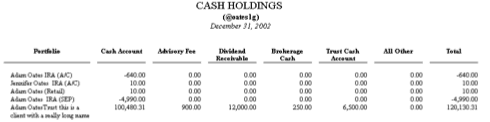
Creating an Equity Assets by Type report and a Cash Hold

Download PDF
CreatinganEquityAssetsbyTypereportandaCashHold.pdf
In this article, you’ll learn how to create two useful variations on the standard Assets Under Management Report – an Equity Assets by Type report and a Cash Holdings Report. No programming required…just a little elbow grease and some willingness to work with Report Writer Pro. If you’re ready, start Report Writer Pro and follow along.
We’ll start with the Equity Assets by Type report.
1. Start Report Writer Pro and choose the Assets Under Management template
2. Choose Define Columns
3. Click once the Market Value column, then click the Properties button
4. Change Header Line 1 from {Asset_Class_Name} to {Security_Type_Name}
5. Click the Repeat button
6. Change Repeat for Each Value from Asset_Class_Code to Security_Type_Code
7. Change Maximum from 6 to 12
8. Include All Other column
9. Change Order Repeating Columns By Value to Security_Type_Display_Order
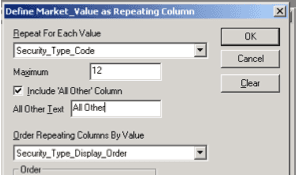
Click OK three times to get all the way back to the main Report Writer Pro window. Test the report so you can see how it looks so far.

Looking good so far…but it shows more than just equity types.
10. Click Data Filter
11. Add a Filter for Asset_Class_Code = e
12. Click Define Report Header
13. Change Title to "EQUITY ASSETS BY TYPE"
14. Move header line 6 {Report_Date_Line} to line 7
15. In line 6, type ($askport) [the text $askport surrounded by regular parentheses, not curly brackets
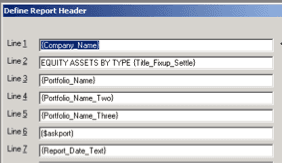
Test again. TaDa!
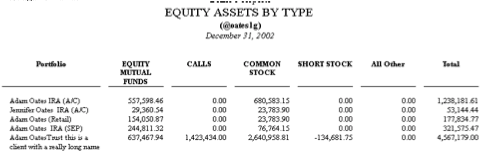
If you’re certain that you don’t have more than 12 equity types, then remove the All Other column. Add a portfolio code column if you prefer. When you’re finished tweaking, be sure to save the .rpw and give it a name.
Now I’m going to give you some homework. Using almost exactly the same steps as above, start with the Assets Under Management report and create a Cash Holdings report where the columns are securities, instead of security types. Here’s your hint: Only steps 4, 6, 11, 13 above will change. All other steps are the same. Send me an email if you get stuck.