
Accessing Cli PortCodes Within Groups

Download PDF
clicodewithinconsolidatedGroups.pdf
Q: A: If you run a Portfolio Appraisal for a consolidated group, what happens?
You get a single portfolio appraisal showing the assets for the entire group.
Q: A: If you run a Portfolio Appraisal for an unconsolidated group, what happens?
You get several portfolio appraisals…one appraisal for each member of the group. Simple enough to understands. If you’ve been using Axys for any period of time, you are extremely familiar with the ins and outs of consolidated and unconsolidated groups. and group & cli files. This article will teach you two more tips and tricks regarding reports
Problem #1: You want to run a portfolio appraisal for a group. You want a single appraisal for the group, but beside each holding, you want to display the portfolio code of the cli file that owns the holding.
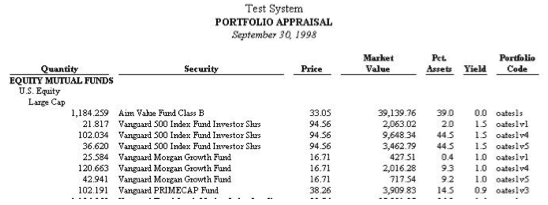
Possible? Definitely. You can accomplish this task using the Axys Report Writer. Here’s how:
1. start Axys Report Writer
2. choose File ‡ New ‡ Portfolio Appraisal
3. if you want to customize the header, choose Define ‡ Report Header. In the example above, I added $askport (the cli code entered in the dialog box when the report is run) to the report header
4. choose Define ‡ Columns.
5. From the list of available columns, select Portfolio Code
6. Click Add to add Portfolio Code to the list of included columns
7. Choose Define ‡ Options
8. Select Management Mode
Now test your report by running it for an unconsolidated group. As shown in the example above, you will get a single portfolio appraisal showing the combined assets for the entire group. Beside each holding, the portfolio code column will show which specific cli file owns that particular holding.
Problem #2: You want to run a transaction summary for a group. You want a single transaction summary for the group, but beside each transaction, you want to display the portfolio code of the cli file that contains that transaction.
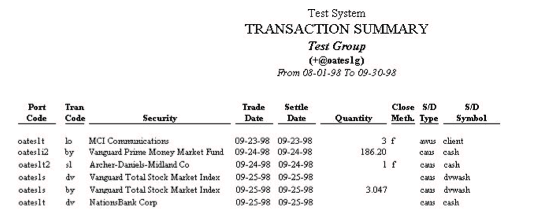
Possible? Yes, but it is not as easily done as the portfolio appraisal, however. To accomplish this task, you’ll need to roll up your sleeves and do a little bit of programming.
In the September 2001 issue of the AUG Newsletter, we showed you how to add a portfolio code to a report. In that article, we walked through the process of adding a portfolio code column to the Assets Under Management report. The variable we used was $:fileo.
To accomplish the task above, you should follow those same instructions. If you don’t have, or can’t find, the Sept 2001 issue of the AUG newsletter, send me an e-mail. I’ll send you the article containing the instructions. The difference in this case is that will want to use the variable $:tfile, instead of the variable $:fileo. Don’t be intimidated…give it a try. As always, if you want these reports, send me an e-mail and I’ll send them to you.
One more note. Have you ever wanted to learn Replang, the Axys report programming language? Here’s your chance. CSSI is now offering Replang training classes. In these three-day, hands-on training classes, you will learn everything you ever wanted to know about creating custom Axys reports. For more information, visit our website www.cssisolutions.com, or send me an e-mail.
