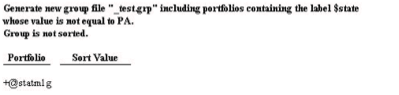

Creating a Group of All Portfolios with Label Not Equal to X
The Portfolio Group/Sort utility in Axys is a handy tool. You can create a group based upon Market Value – eg, all portfolios whose market value falls within a given range. You can create a group based upon percentage of assets – eg, all portfolios where a certain security or security type comprises a given percentage of assets of the portfolio.
Last, but not least, you can create a group based upon portfolio labels.
When you create a group based upon portfolio labels, you have the following choices
label equal to a given value
label less than a given value
label greater than a given value
existence of label
label within a given range
It is an easy matter, therefore, to create a group containing all portfolios with $state=TX. However, suppose you want a group of all portfolios with $state NOT EQUAL to TX. How would you accomplish that task? It would be very convenient of the Portfolio Group/Sort Utility had an option for “label not equal to a given value.” Replang to the rescue! In this quarter’s article, we will learn how to make a new Portfolio Group/Sort Utility that will allow us just the option we want. So…brave and intrepid souls…fire up your text editor, and read on! (Note: the instructions below apply only to the 3.5.1 version of Axys. Earlier versions of the Portfolio Group/Sort Utility have different line numbers and routine names, and thus will not match the figures shown.
1. Your first step is to make a copy of the existing Portfolio Group/Sort Utility, group.rep. Copy this file to a new file…we’ll call it mygroup.rep. Now open mygroup.rep in your text editor. The first few lines look something like this:

2. Now find line 186, and add line 187 (as shown below) to add the Not Equal To selection

3. At the end of line 184, change the 5 to a 6 to expand the box around the selection options

4. Add line 383 to define the text for “not equal to” (appears on the report at the end of the group/sort)

5. Add lines 452 and 453 (compares a string label to the given value and sets $sval if not equal)

6. Add lines 479 and 480 (compares a numeric/date label to the given value, sets #nval if not equal)

All done. Save your file and test it out.